Data is at the heart of any ERP system, and Data Entities are the unsung heroes of Microsoft Dynamics 365 Finance & Operations that make working with data easier. If you’ve ever imported data from Excel, integrated F&O with another app, or synced data with Dataverse, you’ve been using data entities under the hood. In this post, we’ll break down what data entities are, why they matter, and how they power various scenarios. We’ll also highlight the different types of entities and key considerations to keep in mind. (Don’t worry about the “how to” setup details – future posts will dive into configuration. Today, let’s get a clear big-picture understanding.)
What Are Data Entities in D365 F&O?
In simple terms, a Data Entity is an abstraction on top of one or more underlying database tables in Dynamics 365 F&O. Instead of dealing with dozens of related tables, you get a simplified, denormalized view that encapsulates a business concept. For example, a single Customer entity might pull together fields from the Customer table, address table, contact table, etc., into one combined view. This makes it much easier to read or write customer data in one go, without needing to manually join those tables in code or in an integration. In other words, data entities turn complex table structures into easily digestible data sources.


This abstraction isn’t just for convenience – it also insulates the application from changes in the physical tables. If Microsoft changes the underlying tables in a new version, your integrations or customizations that use the entity can stay the same. Data entities thus serve as a stable contract or interface for data. They encapsulate business logic too, meaning any validations or transformations applied in F&O (or custom X++ code on the entity) will run whether data comes from the UI or through the entity. This consistency is great for maintaining data integrity.
Why Do Data Entities Matter?
Data entities might sound technical, but they play a crucial role in almost every data process in Dynamics 365 F&O. They were introduced to unify and simplify data handling across the system. Here are some key reasons data entities are so important:
One-Stop Data Interface: Data entities provide a single, consistent way to interact with data for different purposes – whether you’re importing/exporting data or integrating via APIs, it’s all through entities.
Unified Import/Export Mechanism: They have become the primary mechanism for moving data into or out of F&O, especially for configuration migrations and demo data during implementations.
Ready for Integration: Data entities can be exposed as OData services which makes it straightforward to integrate F&O with other systems and even with Office tools like Excel. Instead of writing custom code to pull data from dozens of tables, integrators can just call a single entity’s API and get all the needed info. This dramatically simplifies building integrations and ensures those integrations automatically respect F&O’s business logic.
Bridge between Technical and Functional Worlds: Because entities encapsulate business concepts it’s easier for functional users to think in terms of entities when working with data management or integrations. For instance, a functional consultant setting up a data import project can select a Customer entity without needing to know every table that comprises a customer record. It makes data tasks more functional-friendly, while still giving technical folks the power to extend and customize as needed.
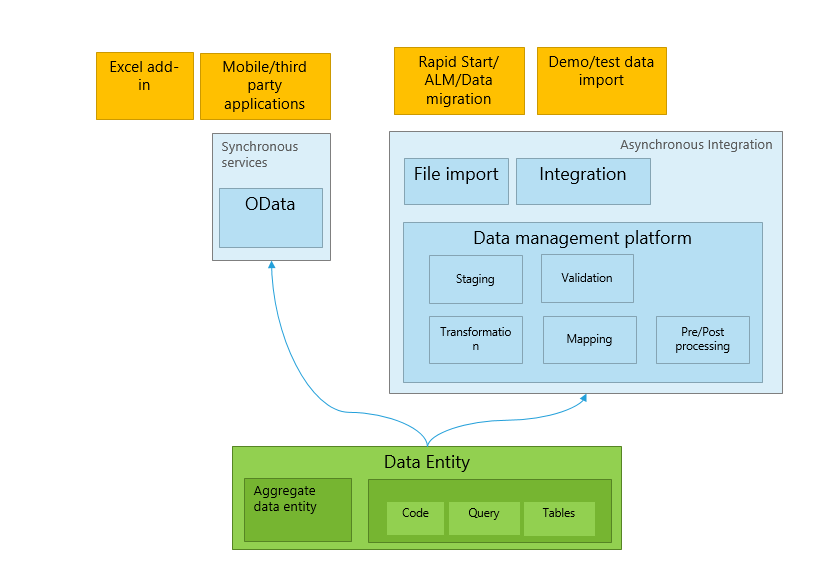
In short, data entities are the backbone of the Data Management Framework in F&O and a cornerstone of all integration and data migration strategies. Microsoft designed them to streamline data operations across the board, and they truly are everywhere in the system!
Using Data Entities for Data Import/Export (Data Management)
One of the most common uses of data entities is in data import/export scenarios. If you’ve used the Data Management workspace in F&O (sometimes still called DIXF from the AX 2012 days), you’ve seen data entities in action. This framework uses entities to handle synchronous or asynchronous bulk data transfers for tasks like migrating data from legacy systems, loading configuration setups, or extracting data to files.

When you perform an import or export using a data project in F&O, here’s what happens under the hood:
- Staging and Target: The Data Management Framework (DMF) will typically insert the data into a staging table associated with the entity, then move it to the final target tables. The staging table has the same fields as the entity and acts as a buffer where validation and transformation occur. This two-step process helps catch errors and apply business logic before data hits the live tables. You can review or clean up staging data if something fails, without corrupting actual records. (It’s also possible to skip staging for performance in certain cases.)
- Data Projects: In the Data Management workspace, you create a Data Project and add one or more entities to it (for example, Customer entity for customer data, Vendor entity for vendor data, etc.). The framework will generate a data package or use specified source files (like Excel, CSV) matching the entity’s format. Because an entity might combine many tables, this greatly simplifies preparing import files – you fill in one file per entity instead of separate files per table.
- Import/Export Execution: When running the import, DMF processes each entity sequentially (or in parallel batches if configured). It parses the source file, populates the entity’s staging table, runs business logic/validation, and then pushes the data into the actual F&O tables. For exports, it reverses the flow – pulling data from F&O into the entity (which can aggregate multiple tables) and then outputting to the desired format (Excel, CSV, XML, or even directly to a SQL database in BYOD scenarios).
- Monitoring and Errors: Data entities also log any validation errors or skips at the staging level. Users can download error logs, fix data in the staging table, and re-run the import for just the failed records. This makes bulk data loading much more manageable. For example, if 2 out of 1000 records have an issue, you can correct those 2 in staging and push them, rather than reprocessing all 1000.
Overall, data entities power both one-time imports/exports and recurring integrations through DMF. In fact, Microsoft notes that entities support not only interactive file import/exports but also scheduled or recurring integrations via files. So whether you’re manually uploading a CSV in the UI or automating nightly data feeds, data entities are doing the heavy lifting. They ensure that the data is handled consistently with F&O’s rules.
There are over 1,700+ out-of-the-box data entities available in F&O as of recent counts, covering basically everything. Chances are, if you need to move or integrate some piece of F&O data, there’s already a data entity for it!
Integration Scenarios (OData, BYOD, Dual-write, Virtual Entities)
Beyond file-based imports and exports, data entities provide the foundation for several integration approaches in Dynamics 365 F&O. They allow external systems to interact securely and consistently with F&O data. Let’s explore the key integration scenarios:
OData APIs (Real-Time Integration)
Dynamics 365 F&O exposes a RESTful OData service endpoint, allowing external applications real-time CRUD operations via data entities. Each public entity acts as a mini web service — perfect for scenarios like web stores creating sales orders or mobile apps checking inventory levels. Since these entities use standard HTTP methods, they easily integrate with third-party systems, respecting F&O’s built-in business logic and security. While OData is ideal for real-time integrations with modest data volumes, it’s not suited for bulk operations, where asynchronous options are preferable.
BYOD (Bring Your Own Database)
For integrations and reporting that don’t require immediate responses, BYOD allows exporting data entities into an external database (such as Azure SQL) managed by your organization. Entities can be scheduled for periodic exports, enabling regular data synchronization – ideal for data warehousing, analytics, and external reporting scenarios (e.g., Power BI). BYOD leverages batch processing, supports incremental exports (using change tracking), and introduces minimal overhead on F&O, although it creates some latency due to scheduled rather than real-time updates.
Dual-write (F&O ↔ Dataverse Two-Way Sync)
Dual-write provides near real-time, bi-directional synchronization between Dynamics 365 F&O and Dataverse, the platform underlying Dynamics 365 Customer Engagement apps (Sales, Customer Service, etc.). It uses F&O data entities to detect and propagate changes instantly to Dataverse tables and vice versa, keeping both systems continuously aligned. Dual-write is ideal for scenarios involving shared master data (customers, vendors, products) between ERP and CRM, leveraging F&O’s existing entity framework to maintain consistency, validation, and business rules. It’s powerful for transactional synchronization but not intended for high-volume bulk data transfers.
Virtual Entities (Live Data from F&O in Dataverse)
Virtual Entities enable Dataverse apps to access F&O data directly, without replicating data into Dataverse itself. The data remains physically stored in Dynamics 365 F&O, but is exposed live through Dataverse as if it were local data. This approach supports full CRUD operations, giving real-time data access without duplication or synchronization delays. Virtual Entities are excellent for scenarios needing instant access to current ERP data – such as Power Platform apps, Power Pages portals, and Power Automate flows – while avoiding redundant storage costs.
Types of Data Entities in Dynamics 365 F&O
Microsoft classifies data entities in Dynamics 365 Finance & Operations into five official categories, each serving a distinct purpose in data management and integration:
Parameter Entities
Parameter entities contain setup and configuration data needed to control the behavior of specific modules or features. Typically, each entity holds a single record with settings that apply broadly to the whole system or module. Examples include General Ledger and Accounts Payable parameters, where you define default accounts, posting behaviors, and numbering sequences. Parameter data is usually established during the initial system implementation or module configuration and is rarely modified afterward. They are critical to ensure modules operate according to business requirements.
Reference Entities
Reference entities provide foundational lookup data essential for smooth business operations. They are typically smaller, static datasets containing standardized values or codes referenced throughout transactions and master data. Examples include currencies, units of measure, tax codes, and payment terms. Reference entities are usually set up early in implementations because transactional records frequently rely on them. They rarely change, providing consistent reference points across different parts of the application.
Master Entities
Master entities represent the main business records – core entities or assets that your organization regularly interacts with, such as customers, vendors, products, and employees. They typically involve extensive data with multiple linked details (addresses, contacts, credit information, etc.). Master data serves as the foundation for transactional processes, providing stable and consistent references throughout the application. Given their volume and complexity, master entities require careful maintenance and are commonly synchronized with other systems through integrations.
Document Entities
Document entities represent transactional records still undergoing processing documents that have not yet been finalized or posted. They typically have hierarchical structures with a header and multiple lines, such as sales orders or purchase orders. These documents reflect active operational activities like journal entries, invoices awaiting posting, or open inventory balances. Once processing is complete, document entities transition into posted transactions, becoming permanent records in the system. Document entities provide visibility and control during active business processes.
Transaction Entities
Transaction entities store completed, historical records of business activities – typically finalized, posted transactions. They represent detailed records like posted invoices, ledger entries, payment transactions, and inventory movements. Transactional data accumulates extensively over time, serving as the organization’s financial and operational history. Because of their volume and sensitivity, these entities are often treated carefully during data migrations or system copies, frequently summarized rather than transferred in full. Transaction entities are critical for accurate historical reporting, auditing, and compliance purposes.
Key Considerations (Performance, Extensibility, Security)
Before we wrap up, let’s touch on a few key considerations when working with data entities in F&O:
Performance: While data entities simplify data access, you still need to use the right tool for the job to ensure good performance. Real-time OData calls are convenient but can become slow when pulling large datasets (and excessive calls can hit throttling limits). For bulk data retrieval or sync, consider using the asynchronous Data Management pipeline or BYOD, which can handle higher volumes via batch processing. For example, instead of a client app paging through hundred thousands of records over OData, you might schedule a nightly export of that data to a BYOD database and let the app query it there. Similarly, if you need to import millions of rows, break them into batches and use the Data Management import rather than trying to push through the live API. Also, take advantage of features like change tracking on entities to do incremental loads – F&O can track changes on underlying tables so that exports only pull delta changes rather than full dumps, which is much more efficient. Another performance tip: be mindful of how many entities you pack into a single data project or export job. Microsoft recommends not bundling hundreds of entities into one job, as it can increase run time and risk of failures; instead, group data logically and run multiple jobs if needed.
Extensibility & Customization: Data entities are part of the F&O platform and are meant to be extended. As your business requirements change, you might need to customize entities. Common extensions include adding new fields (especially if you’ve added custom fields to the source tables – you want your entity to expose them), or adding new data sources to an entity (maybe pulling an extra related table’s data). This can be done via the extension in Visual Studio. You can also create entirely new data entities for any custom tables you create, so they too can participate in import/export and integration. The system’s Entity list can be refreshed to include new entities you add. When creating or modifying entities, keep data integrity in mind – define proper primary keys and relationships so that the entity works well with change tracking and doesn’t create duplicates. It’s also worth noting that data entities can have their own business logic. You can override insert/update methods in the entity class to, for example, call some process after data is imported. Leverage these hooks to enforce data quality (but be careful not to introduce heavy logic that slows down imports). The good news is that, because entities centralize the logic, any validation you add there will apply to all import sources (DMF, OData, etc.). From an upgrade perspective, adding an entity or fields via extension is supported and will carry forward in updates, but always test after upgrades in case underlying tables changed. One more thing – if you plan to use incremental export, ensure your entity has a proper unique key defined; sometimes you might need to add a surrogate key field or combination to make it truly unique for change tracking to work. Overall, the platform is quite flexible: with 1700+ entities out of the box and the ability to tweak or create your own, you can cover almost any data scenario.
Security: Security for data entities is layered on top of the standard F&O security roles and privileges. By default, a user can only access data through an entity if they have rights to that data in the application. You can grant or restrict privileges accordingly – F&O provides out-of-the-box security artifacts for most entities, and you can create custom ones for your own entities. It’s a good practice to review what entities are public and ensure that only the appropriate roles have access to them. If an entity is sensitive (say it exposes payroll data), you might choose not to mark it public at all, or limit who can call it.
What This Means for You
Data entities are truly the game changer in Dynamics 365 F&O – they enable everything from bulk migrations to real-time integrations and analytics. In this overview, we’ve seen what they are (business-friendly data wrappers over tables), why they’re essential (unifying data processes and enabling easier integration), and how they get used in key scenarios like import/export, OData APIs, BYOD, dual-write, and reporting. We also touched on the different flavors of entities and some important considerations to get the best out of them.
By understanding data entities, both technical and functional users can better plan data strategies in F&O. Functional consultants can identify which entities to use for a given task (e.g. “Use the Customer entity to import customers”), and technical developers can leverage or extend entities to meet integration requirements. They provide a common language – a functional person can say “we need to bring in product data via the Released product entity” and the developer knows exactly what that entails in terms of tables and logic.
In upcoming posts, we’ll dive deeper into the practical side: for example, how to set up a data entity for custom fields, tips for configuring change tracking for incremental exports, how to optimize entity performance, and step-by-step guides to import/export configurations. So stay tuned for those hands-on tutorials!
Have you worked with data entities in your projects? Share your experiences or tips below — let’s keep the conversation going!
Links
https://learn.microsoft.com/en-us/dynamics365/fin-ops-core/dev-itpro/data-entities/data-entities
https://learn.microsoft.com/en-us/dynamics365/fin-ops-core/dev-itpro/data-entities/configuration-data-projects
https://learn.microsoft.com/en-us/dynamics365/fin-ops-core/dev-itpro/analytics/export-entities-to-your-own-database
https://learn.microsoft.com/en-us/dynamics365/fin-ops-core/dev-itpro/analytics/analytics
https://learn.microsoft.com/en-us/dynamics365/fin-ops-core/dev-itpro/data-entities/security-data-entities
https://learn.microsoft.com/en-us/dynamics365/human-resources/hr-admin-integration-byod-batch-jobs
 Dynamics Lab
Leave a comment